It may be the end of the road for this particular learning journey but I imagine it's only the beginning of learning about technology innovations. I wasn't sure about the whole thing when I started but I'm glad I started and stuck with it.
What are my favorites among the 23 things? I'd have to say RSS feeds and Delicious. Flickr is OK, but I'm a Webshots fan and also have some pictures on Multiply. Don't think I'll ever get into IMing. Maybe if my friends and relatives were into it I'd give it a shot, but they're not. I never thought I'd put a video on YouTube, but I did (though I doubt if my daughter will thank me). Overall, I've enjoyed this opportunity. I like learning new things and am a little bit of a computer geek anyway, so this was perfect. How much of it I will be able to actually use at the library is questionable since what I already do there takes up the time available.
I do know that if the Library Commission were to offer another similar learning opportunity, I would participate. I like the learning pretty much at my own pace & at a time & place of my choosing, I like the CE hours and I like that this has saved me about 4 or 5 trips to classes & workshops for the same number of CE hours. And, if I were to win an MP3 player, that would just be frosting on the cake!
Showing posts with label 23 Things. Show all posts
Showing posts with label 23 Things. Show all posts
Friday, January 9, 2009


Thing #22..........Podcasts
I used to listen to a few podcasts through Itunes but I don't have an IPod so I was tied to the computer. I'm glad to find some other podcast directories. Found a few of my old favorites and added Leo Laporte's "This Week in Tech" to my Google Reader listings. I've always liked Leo. Anybody remember the old "Screensavers" show on TechTV? I learned so much from that show. I know the directions say to add it to Bloglines but I switched to Google Reader a while back. I saw some book review podcasts that I think I'll go back to at another time. Other than those I'm not sure how this would benefit my library. I could listen to podcasts of workshops or presentations I missed maybe. Maybe podcast book reviews could be done and put on a library's website? Probably not something I will do. There just isn't time in the day to do all this stuff. Cool as it may be.
Can I download any of these podcasts to my Sansa MP3 player? I hope so, because if I have to be tied to the computer to listen to them I'll listen to very few.
Can I download any of these podcasts to my Sansa MP3 player? I hope so, because if I have to be tied to the computer to listen to them I'll listen to very few.
Thing #21
I'd watched videos on YouTube before, so this wasn't completely new to me. Once I had ordered my quilting machine I searched for videos on machine quilting, lining up pantographs, loading the quilts, etc. And heaven knows I've watched the kids watching funny cat videos at the library. So, I decided to go one better than our exercises instruct. I uploaded a video my granddaughter took with my digital camera at Christmas and this is it: That's my daughter & grand-daughter playing their new Wii at our house on Christmas Day.
A library could use YouTube to publish a promotional video. Or, maybe video some library activity so the kids & their parents could see themselves in a video. Could video a presentation or how-to video (like using the microfilm reader or something like that) and patrons could watch it. YouTube could be a useful tool but there's also an awful lot of crap on it that it would be just as well without. I guess the same applies here as anywhere...be selective.
A library could use YouTube to publish a promotional video. Or, maybe video some library activity so the kids & their parents could see themselves in a video. Could video a presentation or how-to video (like using the microfilm reader or something like that) and patrons could watch it. YouTube could be a useful tool but there's also an awful lot of crap on it that it would be just as well without. I guess the same applies here as anywhere...be selective.
Thing #20
Since I have an interest in genealogy I explored the My Heritage app site. It is the winner in the genealogy category & says it is free, private and secure. It claims to have more than 28 million members, include more than 300 million names and host more than 5 million family sites. I did find several listings for Risinger family sites but other names I searched came up with nothing. The site offers family web sites, genealogy searching, photo posting, message boards and downloadable Family Tree Builder software. I already use Legacy Family Tree but for someone just starting out this might be a free option for software. One of the interesting things about the site is their claim to use advanced face recognition technology that you can use to find relatives on the site. They offer a look alike meter to find resemblances between your child and you or other relatives. You can also see if you resemble a celebrity and strangest of all there's a program to morph yourself with a celebrity. You can even order flowers or gifts to be sent on this site. The pricing is in Euros so I'm assuming this is a European site. I intend to come back to the site when I have more time and I've bookmarked it on Delicious and my own computer.
Thing #19.....Will it be there tomorrow?
My main concern about online apps? How reliable are they? Will it be a case of here today, gone tomorrow? We've seen websites that seemed useful come and go. And some become so changed they are hardly recognizable. Some start out free & change to for pay. I can also see some convenience in these sites. For someone who travels frequently for business or to give classes or presentations an app like Google Docs or something similar could be a way of not having to lug that laptop along. Store the the needed documents or presentations online and access them from any computer. Print your handouts onsite and not have to carry them with you. (I'd still have everything on a disc in my luggage.) The convenience I see is the same as for Delicious---having your material available from any computer. If using these products, I would still keep a copy of the material on my own hard drive or a removable disc while also keeping them online as another means of backup. I just find it hard to trust all this online stuff, know what I'm sayin'?
PS...I wrote this in Google Docs & published to my blog.
PS...I wrote this in Google Docs & published to my blog.
Things 17 & 18....Learning about Wikis
Wikis are another of those things I had heard a few things about so I know what they are. After visiting the examples I have a better idea of how a wiki can be used. I guess I have a few reservations about them simply because anybody can add or change information so it could be fact or mere opinion. I can see them as being useful in certain situations. For instance, in a library much larger than mine a wiki could be used to keep staff informed and let them add their comments or info or questions and collaborate on projects when they don't all work at the same time. A book review wiki for a library would be easy to change and add to. A Library News wiki would be easier to add to than dealing with changing a web page all the time. When I saw the examples for community wikis I thought that would be so much easier to maintain than the website Nebraska communities have through NPPD where the info has to be sent in for someone there to make the changes, changes have to be paid for and can only be done a certain number of times per year. It'd be so much easier to keep it current. Of course, it would have to be set up so only certain people could make the changes to keep it from being a free for all.
I played on PBwiki, adding my blog to the Nebraska Learns 2.0 favorites and added my favorite quilting page to favorite pages other than my blog. Not hard at all.
I played on PBwiki, adding my blog to the Nebraska Learns 2.0 favorites and added my favorite quilting page to favorite pages other than my blog. Not hard at all.
Not the ideal day..............
This is the view out my front door as of about ten minutes ago. I think I'll stay in and find something to do where it's dry, warm & and not windy. Maybe something like ironing some of these fabrics and starting the cutting on Quiltville's Double Delight mystery, which is no longer a mystery to me since I have printed out all the available steps.
 These piles of fabric I pulled for the mystery have been growing. It's scrappy so I want lots of variety in the pinks & neutrals. I'd like a few more blues, too, so I may have to dig through those a little more.
Or, maybe instead of working on the quilt I should get back to finishing the 23 Things in the Nebraska Learns 2.0 online class. The end of January will be here before we know it. Decisions, decisions.
 Maybe something like ironing some of these fabrics and starting the cutting on Quiltville's Double Delight mystery, which is no longer a mystery to me since I have printed out all the available steps.
 These piles of fabric I pulled for the mystery have been growing. It's scrappy so I want lots of variety in the pinks & neutrals. I'd like a few more blues, too, so I may have to dig through those a little more.
Or, maybe instead of working on the quilt I should get back to finishing the 23 Things in the Nebraska Learns 2.0 online class. The end of January will be here before we know it. Decisions, decisions.
Saturday, December 6, 2008
Thing #16 -- Week 11
Just to make sure I got ALL the information I read all the recommended articles on Library 2.0 & Web 2.0. A LOT to absorb, so my thoughts expressed here will be rather random.
[1.] Libraries ARE changing & computers and easier access to information are a big part of that change.
[2.] All this 2.0 stuff seems to mean librarians will spend an awful lot of time on the computer. What about acquisitions, cataloging, processing books for the shelf, circulation, reference, in other words, everything we've always done & much of which we will continue to do for the foreseeable future. Where will all the time come from? Not to mention all the new skills. I don't think we can get time from a government bailout.
[3.] What about our patrons & their skills? For any number of years yet, we'll have two groups of them -- Generation Y, the young people who have never known a world without computer technology, cell phones, IM, texting, social websites, downloadable music, etc., and the older group, some of whom are still struggling to learn basic computer skills & e-mail. That group is used to a library geared to books. It's what they know & it's what they want.
[4.] I think we need to pick and choose what 2.0 things we can make use of in our libraries. Introducing them slowly will make the younger people think we're not completely hopeless and will allow the older patrons to learn a little at a time and not feel totally overwhelmed, which is how I'm feeling a little bit right now.
[1.] Libraries ARE changing & computers and easier access to information are a big part of that change.
[2.] All this 2.0 stuff seems to mean librarians will spend an awful lot of time on the computer. What about acquisitions, cataloging, processing books for the shelf, circulation, reference, in other words, everything we've always done & much of which we will continue to do for the foreseeable future. Where will all the time come from? Not to mention all the new skills. I don't think we can get time from a government bailout.
[3.] What about our patrons & their skills? For any number of years yet, we'll have two groups of them -- Generation Y, the young people who have never known a world without computer technology, cell phones, IM, texting, social websites, downloadable music, etc., and the older group, some of whom are still struggling to learn basic computer skills & e-mail. That group is used to a library geared to books. It's what they know & it's what they want.
[4.] I think we need to pick and choose what 2.0 things we can make use of in our libraries. Introducing them slowly will make the younger people think we're not completely hopeless and will allow the older patrons to learn a little at a time and not feel totally overwhelmed, which is how I'm feeling a little bit right now.
Thing #15 -- Week 10
SlideShare. This is something that I don't think I will be using since I never have reason to use PowerPoint for anything. I did set up an account{http://www.slideshare.net/quiltinlibrarylady}, looked at presentations, picked out a couple favorites, commented, and added Nebraskacess as a contact. So I'm no longer totally ignorant about it. I WOULD rather read the slides from a presentation on SlideShare than on a hand-out where they are usually so small I can't make out the text. Or so dark nothing shows up. Maybe I could make a slideshow of my quilts & embed it in my blog?
Thing #14 -- Week 9
Delicious. I would associate this word more with food than computers. However, after watching the short video and going through the various exercises, I think I'll find this very useful. Maybe the most useful thing we've learned in this journey so far. I'm one of those people who works on at least three computers and have bookmarks on all of them. Of course, whichever computer I'm on doesn't always have the bookmark I'm looking for. This would certainly solve that problem. I've signed up for an account and will start moving my bookmarks over as I have time.
I checked out the Holdrege Public Library's tagroll and they have certainly done a lot with Delicious. I'm not sure I'll go as far as doing something like that with our lists of sites on our web page, but then again, never say never.
If I were to tag the NebraskAccess site I would use nebraskaccess & databases, as several others did. Then I would add magazines, biography and genealogy.
For me, the best part of Delicious is the ability to share bookmarks from any computer with Internet access.
I checked out the Holdrege Public Library's tagroll and they have certainly done a lot with Delicious. I'm not sure I'll go as far as doing something like that with our lists of sites on our web page, but then again, never say never.
If I were to tag the NebraskAccess site I would use nebraskaccess & databases, as several others did. Then I would add magazines, biography and genealogy.
For me, the best part of Delicious is the ability to share bookmarks from any computer with Internet access.
Wednesday, November 12, 2008
Thing #13....Twittering
I've just spent some time learning about Twitter..............reading the articles, setting up an account (I'm opl_lady), posting first tweet, started following a few other posters. All interesting enough but I don't think it's going to become a regular part of my life.....either personal or at the library. My personal friends aren't into this 2.0 stuff and at the library it's just me & two aides who aren't interested in these things. Our form of communication most times is a sticky note on the desk.
Now, I may have "hermit" tendencies, but I just don't feel a need to be constantly connected to other people via things like Twitter & IM. I don't even have a cell phone, for cryin' out loud, and always wonder who all those people are talking to when I meet their cars on the highway & they all have a cell phone glued to their ear.
I'll keep reading the accounts I'm following, at least for a while, & try to post to mine, maybe it will grow on me, who knows?
Now, I may have "hermit" tendencies, but I just don't feel a need to be constantly connected to other people via things like Twitter & IM. I don't even have a cell phone, for cryin' out loud, and always wonder who all those people are talking to when I meet their cars on the highway & they all have a cell phone glued to their ear.
I'll keep reading the accounts I'm following, at least for a while, & try to post to mine, maybe it will grow on me, who knows?
Monday, November 10, 2008
Thing #12 -- LibraryThing
I'm all recovered from election day now and back at work on the 23 Things. Last Tues. was a loooooooong day. 6:30am to 9:30pm by the time I took the ballots to the courthouse after the polls closed.
I just finished learning all about LibraryThing and entered a few books that I've read. I like how quickly it catalogs. We'd have to pay extra to get that feature on our library automation system. When I get some time (ha) I want to explore the groups some more, I've only looked at a couple so far. I'll be honest, when I first read about LibraryThing my first thought was, "Wow, another social networking thing. Just what the world needs. But, at least it's about books." After reading further and actually using it I can see some possibilities. Maybe we need a 24th thing -- how to clone yourself--so we have time to try out some of those possibilities in our libraries!
Anyway, here's the URL to "my" little library: http://www.librarything.com/catalog/linda5264
I just finished learning all about LibraryThing and entered a few books that I've read. I like how quickly it catalogs. We'd have to pay extra to get that feature on our library automation system. When I get some time (ha) I want to explore the groups some more, I've only looked at a couple so far. I'll be honest, when I first read about LibraryThing my first thought was, "Wow, another social networking thing. Just what the world needs. But, at least it's about books." After reading further and actually using it I can see some possibilities. Maybe we need a 24th thing -- how to clone yourself--so we have time to try out some of those possibilities in our libraries!
Anyway, here's the URL to "my" little library: http://www.librarything.com/catalog/linda5264
Tuesday, October 28, 2008
Thing #11
Well, I'm up to Thing #11 on this journey called Nebraska Learns 2.0. The exercise for this item is to blog about technology, any technology. That's a pretty broad field so I think I'll try to keep to technology as it applies to our local library. I've worked there long enough to remember typing (on a typewriter, remember them?) a minimum of 3, up to 6 or 7 catalog cards for each item added to the collection. I remember when someone needed something we didn't have in the library we would try to come up with something to order on Inter-Library Loan using an outdated Books In Print because we couldn't afford the newer version. I also remember telling patrons they would just have to go to a larger library, maybe Norfolk, to have a better chance of finding what they needed. It's been a long time since I had to do that.
TECHNOLOGY has made the difference. Specifically computers & the Internet. There's an awful lot of downright crap on the Internet but there are also lots of excellent resources. One does have to be careful about sources, but now if I can't find exactly what a patron needs, I can at least look on Amazon.com or in other libraries' online catalogs to find a book to ILL.
The library got its first computer early in 1992, after using a loaner from the Northeast Library System for about three months. That was the first I had used a computer. Since then I have gone from DOS, through several versions of Windows up to XP. Windows Vista came on my lastest laptop but my printer would only partially work with it and my scanner not at all so I nixed Vista and put XP on. It's a Sony & if you are at all familiar with the way Sony does things you know there's a long story involved. Let's not go there.
Anyway, from the library getting that first computer in '92, we've gone to 5 public use computers with Internet access, an automated circulation system & OPAC, a digital microfilm reader that prints through a computer, and a laptop & digital projector. As the librarian, I've done purchasing, set-up, networking, repairs and lived through switching to automation. I've built web pages, added RAM memory, changed out hard disks and power supplies, set up wireless networking. Not bad for a girl born just barely after TV was making an appearance in the American home.
Technology keeps taking us in new directions. When I first started working in the library we had books, magazines and the vertical file (remember those?). Oh, and vinyl records, jigsaw puzzles & sewing patterns. The records, puzzles & patterns went by the wayside and we got books on tape, now books on CD or in mp3 format. Video tapes have given way to DVDs. Currently the big push is for gaming in libraries. Seems libraries try anything to get people in the door. The thing is, with all this great stuff how do you get the money to pay for it all? As a small library in a town of less than 400, with about 400 registered patrons we have to ask ourselves just what it is we want to be doing. Yes, we make use of technology to provide for our patrons' needs, but the biggest share of our budget is & will continue to be spent on books. Our library will not become the local gaming arcade. Spending money on that would take away from our primary goal of providing reading material and information for our community. We pick and choose our technology to best suit our goals.
Now, I've rambled on for long enough. It's time to check out the blogs of other Nebraska Learns 2.0 participants.
TECHNOLOGY has made the difference. Specifically computers & the Internet. There's an awful lot of downright crap on the Internet but there are also lots of excellent resources. One does have to be careful about sources, but now if I can't find exactly what a patron needs, I can at least look on Amazon.com or in other libraries' online catalogs to find a book to ILL.
The library got its first computer early in 1992, after using a loaner from the Northeast Library System for about three months. That was the first I had used a computer. Since then I have gone from DOS, through several versions of Windows up to XP. Windows Vista came on my lastest laptop but my printer would only partially work with it and my scanner not at all so I nixed Vista and put XP on. It's a Sony & if you are at all familiar with the way Sony does things you know there's a long story involved. Let's not go there.
Anyway, from the library getting that first computer in '92, we've gone to 5 public use computers with Internet access, an automated circulation system & OPAC, a digital microfilm reader that prints through a computer, and a laptop & digital projector. As the librarian, I've done purchasing, set-up, networking, repairs and lived through switching to automation. I've built web pages, added RAM memory, changed out hard disks and power supplies, set up wireless networking. Not bad for a girl born just barely after TV was making an appearance in the American home.
Technology keeps taking us in new directions. When I first started working in the library we had books, magazines and the vertical file (remember those?). Oh, and vinyl records, jigsaw puzzles & sewing patterns. The records, puzzles & patterns went by the wayside and we got books on tape, now books on CD or in mp3 format. Video tapes have given way to DVDs. Currently the big push is for gaming in libraries. Seems libraries try anything to get people in the door. The thing is, with all this great stuff how do you get the money to pay for it all? As a small library in a town of less than 400, with about 400 registered patrons we have to ask ourselves just what it is we want to be doing. Yes, we make use of technology to provide for our patrons' needs, but the biggest share of our budget is & will continue to be spent on books. Our library will not become the local gaming arcade. Spending money on that would take away from our primary goal of providing reading material and information for our community. We pick and choose our technology to best suit our goals.
Now, I've rambled on for long enough. It's time to check out the blogs of other Nebraska Learns 2.0 participants.
Wednesday, October 22, 2008
Thing #10
Image generators--fun I guess. Could be an excellent time waster, sure wish I had more time. I tried this one at: http://makesweet.com to create this:
http://makesweet.com/mixer/wbK03qxI34
http://makesweet.com/mixer/wbK03qxI34
Thing #9
Who would have thought there would be so many Flickr tools and 3rd party programs? It kind of looks to me like there are people out there with programming skills who don't have enough to do. LOL I played around with a few of them but didn't find anything I thought would be useful in the library, though that's not to say there aren't any, I just didn't have a lot of time to spend on looking. I did play a little bit with one called Gickr--allows you create animated GIFs (GIF animations) from your flickr photos. It's homepage is: http://gickr.com/
I thought it might be used to display photos on a web page or blog.
http://gickr.com/results4/anim_b9ba63fc-11b6-7684-0502-65ec06034426.gif
I can't say that I like the effect at all. The animation shows up on a separate window from the blog.
I thought it might be used to display photos on a web page or blog.
http://gickr.com/results4/anim_b9ba63fc-11b6-7684-0502-65ec06034426.gif

I can't say that I like the effect at all. The animation shows up on a separate window from the blog.
Thing #8
Learning about Flickr has been interesting. I have albums on Webshots & Multiply but had never tried Flickr. Maybe because it is "THE" photo site these days is why I shyed away from it---never follow the herd, you know? Anyway, I went ahead and set up an account, which was easy since I already had a Yahoo! identity. Then I posted a couple pictures to the Pets of Nebraska Librarians group--------and,ta da, here they are at: http://www.flickr.com/groups/petsofnelibrarians
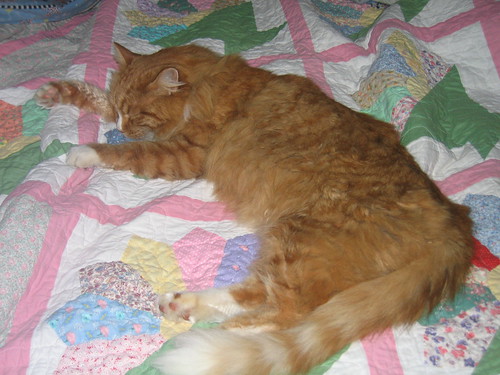
Here are my two kitties, Nicky & Nuey. They are posted to the Pets of Nebraska Librarians group, but if you aren't part of that group you might not be able to see them.


Here are my two kitties, Nicky & Nuey. They are posted to the Pets of Nebraska Librarians group, but if you aren't part of that group you might not be able to see them.

Saturday, October 18, 2008
Thing 6 &7
I've taken to RSS feeds like a duck to water. It just makes keeping up with the blogs I read so easy. I read quite a few quilting and scrapbooking blogs and needing to check each one, each day was becoming a chore. Now, Bloglines tells me if there's an update & I don't waste time going to each one, only to be disappointed when there's nothing new. I've also added some feeds to library related & computer related blogs, now that keeping up is so simple.
RSS feeds were one of those things I knew about, just never took the time to learn what they are all about, how to use the readers and what was in it for me. Nebraska Learns 2.0 gave me the incentive I needed.
RSS feeds were one of those things I knew about, just never took the time to learn what they are all about, how to use the readers and what was in it for me. Nebraska Learns 2.0 gave me the incentive I needed.
Friday, October 17, 2008
I did it!!
I know that I'm hopelessly behind the times, but last night was the first time I had ever IMed. I know everybody, young & old, uses Instant messaging all the time, including my granddaughter and the young people using computers at the library. My family & circle of friends has been content with e-mail for the most part. If we want instant communication we still pick up the phone. Anyway, I had a nice conversation with Allana at the Library Commission last night, so I guess I have completed Thing #5. I really don't see myself using it a whole lot though.
Would it be useful at our library? I just don't know. I'm certainly very clumsy at using it and I don't see my two aides being a whole lot better. For the present we will still rely on the telephone for reference questions that don't involve a patron coming in and standing in front of the desk. But, I can at least tell my granddaughter that I CAN IM. I doubt if she'll want to become my "friend" though. It's probably not cool to IM with Grandma. LOL
Would it be useful at our library? I just don't know. I'm certainly very clumsy at using it and I don't see my two aides being a whole lot better. For the present we will still rely on the telephone for reference questions that don't involve a patron coming in and standing in front of the desk. But, I can at least tell my granddaughter that I CAN IM. I doubt if she'll want to become my "friend" though. It's probably not cool to IM with Grandma. LOL
Saturday, October 11, 2008
Backin' up a little
It occurred to me that I never posted about Things 1 & 2. I'm expecting NE Learns 2.0 to be a great learning adventure. Maybe everyone wouldn't agree but I always find learning new things to be a great adventure. I've been a life long learner for as long as I can remember, and a lot of things I've taught myself from books, videos & dvds. Now we have all these wonderful online learning opportunities.
Regarding the habits of lifelong learners, I'm probably best at playing--I play with computers, I play with my fabrics, I play with my quilting machine and sometimes working at the library is almost more play than work.
Now for the rest of them: #1. Always. When I learn how to solve a computer glitch the end I have in mind is a working computer. When I had to learn to time my quilting machine the end I had in mind was good stitches. When I learn to make a new quilt block I expect to have a quilt someday. #2. Always. If I don't accept the responsibility for my own learning, who will? #3. A computer that won't boot up is definitely a problem and a real challenge. #4. I guess I have confidence in my abilities as a learner because anytime there is something I want to learn to do, I do it. #5. You should see my collection of books, manuals, magazines, videos & dvds. Plus, I believe in always having more than one computer available for doing research when one of them fails. #6. See #5. #7. I guess I do this without even thinking about it. I'm always helping patrons at the library with using the library or computers or microfilm reader. People are always calling me with computer questions when they have problems & I help them as much as I can. Now, fixing a sick computer over the phone is a CHALLENGE :) Especially when the person on the other end of the line is pretty much computer illiterate. #7 1/2. Play, Play, Play. The part I love best!
Regarding the habits of lifelong learners, I'm probably best at playing--I play with computers, I play with my fabrics, I play with my quilting machine and sometimes working at the library is almost more play than work.
Now for the rest of them: #1. Always. When I learn how to solve a computer glitch the end I have in mind is a working computer. When I had to learn to time my quilting machine the end I had in mind was good stitches. When I learn to make a new quilt block I expect to have a quilt someday. #2. Always. If I don't accept the responsibility for my own learning, who will? #3. A computer that won't boot up is definitely a problem and a real challenge. #4. I guess I have confidence in my abilities as a learner because anytime there is something I want to learn to do, I do it. #5. You should see my collection of books, manuals, magazines, videos & dvds. Plus, I believe in always having more than one computer available for doing research when one of them fails. #6. See #5. #7. I guess I do this without even thinking about it. I'm always helping patrons at the library with using the library or computers or microfilm reader. People are always calling me with computer questions when they have problems & I help them as much as I can. Now, fixing a sick computer over the phone is a CHALLENGE :) Especially when the person on the other end of the line is pretty much computer illiterate. #7 1/2. Play, Play, Play. The part I love best!
Thursday, October 9, 2008
Just startin' out
My very first post!! I set up this blog as a part of the Nebraska Learns 2.0 project through the Nebraska Library Commission. I have to admit that while I want to learn about these technologies that I'm not very familiar with, I also find the opportunity to earn those 15 CE hours without burning expensive gas as darned attractive :) Can you say "darned" on a blog post?? Oh well, I just did.
Just to tell you a little about myself: I am a Library Director of a library in a very small Nebraska town. My family consists of a husband, daughter, son, son-in-law, daughter-in-law, three grandchildren & two cats. Mustn't forget the cats, they think they should rate higher than any of the others, LOL. In my "spare" time I like to read (blogs mostly, of late), piece quilts, scrapbook digitally, research genealogy and learn to master my new quilting machine that I just got in August. I know I probably spread myself too thin, and now I'm adding the Nebraska Learns 2.0 to my list for the next few weeks. We'll see how it goes.
Just to tell you a little about myself: I am a Library Director of a library in a very small Nebraska town. My family consists of a husband, daughter, son, son-in-law, daughter-in-law, three grandchildren & two cats. Mustn't forget the cats, they think they should rate higher than any of the others, LOL. In my "spare" time I like to read (blogs mostly, of late), piece quilts, scrapbook digitally, research genealogy and learn to master my new quilting machine that I just got in August. I know I probably spread myself too thin, and now I'm adding the Nebraska Learns 2.0 to my list for the next few weeks. We'll see how it goes.
Subscribe to:
Posts (Atom)